To conserve battery power on long outings, turn off unnecessary features like Bluetooth, Wi-Fi, and location services, and reduce screen brightness. Close background apps and activate your device’s battery saver mode to limit energy drain. Using a quality power bank helps keep your device charged without relying solely on outlets. Maintaining good battery habits—like avoiding deep discharges—also extends lifespan. Keep these tips in mind to make your device last longer; you’ll find more useful strategies ahead.
Key Takeaways
- Enable battery saver mode and dim screen brightness to reduce power consumption.
- Turn off unused features like Bluetooth, Wi-Fi, and location services when not needed.
- Close background apps and limit high-power activities such as streaming or gaming.
- Use a quality power bank with fast-charging to replenish battery efficiently during outings.
- Maintain battery levels between 20% and 80% and avoid full discharges to extend overall battery life.

Are you wasting your juice without even realizing it? If you’re heading out for a long day and relying on your phone or other gadgets, it’s easy to drain your battery faster than expected. Without proper planning, you might find yourself stuck with a dead device when you need it most. The key to avoiding this frustration is understanding how to conserve your battery power effectively and keep your devices running longer. One of the best ways to do this is by using power banks wisely. These portable chargers can be lifesavers, letting you top up your device when needed. But it’s not just about carrying a power bank; it’s also about managing your device’s battery health and usage habits to extend its lifespan and maximize its capacity over time.
First, consider how your device’s battery health impacts its longevity. Batteries degrade with each charge cycle, meaning their capacity diminishes slowly over time. To preserve this, avoid letting your battery drain completely or stay fully charged for extended periods. Instead, aim to keep your battery level between 20% and 80%. When you’re outdoors and away from power sources, having a good power bank can help keep your battery from hitting critical lows. However, don’t just rely on the power bank to do all the work—use it smartly. For example, turn off unnecessary features like Bluetooth, Wi-Fi, and location services when you’re not using them. Dim your screen brightness and close background apps to reduce energy drain. These small adjustments can substantially extend your battery life and reduce the frequency of recharges needed.
Another tip is to be mindful of app usage. Streaming videos, gaming, and social media apps tend to consume a lot of power quickly. Limiting their use or closing them when not needed can make a big difference. Also, activating battery saver mode can help stretch your remaining juice. Many devices have this feature built-in, which reduces background activity and optimizes device performance to conserve power. When you do need to recharge, using a quality power bank with fast-charging capabilities ensures you spend less time plugged in and more time on the go. Just remember, regularly using power banks correctly and maintaining good battery health habits can greatly prolong your device’s overall lifespan. Additionally, choosing a high-quality home theatre projector with efficient power management features can help reduce overall energy consumption during extended viewing sessions.

Anker Portable Charger, 10,000mAh 30W Power Bank, USB-C in and Out Fast Charging Battery Pack, Travel Essential Phone Power Bank, for iPhone 17/16, Galaxy and More (Black, 10000.00, Milliamp Hours)
Speedy 30W Charging: Experience cutting-edge 30W fast charging technology—twice as fast as 5V/3A chargers. Boost an iPhone 16…
As an affiliate, we earn on qualifying purchases.
As an affiliate, we earn on qualifying purchases.
Frequently Asked Questions
Can Turning off Wi-Fi Save Battery When Not in Use?
Yes, turning off the Wi-Fi toggle when not in use can save your battery. Your device constantly searches for networks, draining power even if you’re not connected. Enabling battery saving modes also helps preserve juice. When you’re out and about, switching off Wi-Fi and activating these modes reduces background activity, extending your device’s battery life. It’s a simple but effective way to keep your phone powered longer on long outings.
Does Lowering Screen Brightness Significantly Extend Battery Life?
Lowering your screen brightness can markedly boost battery longevity—up to 30% according to recent studies. When you dim your screen, your device uses less power, especially on OLED displays where dark pixels consume less energy. This simple adjustment helps your battery last longer during long outings. So, turn down that brightness, and you’ll extend your device’s usage time, ensuring your phone stays powered when you need it most.
How Does Enabling Airplane Mode Affect Device Power Consumption?
Enabling airplane mode boosts device power optimization by turning off cellular, Wi-Fi, and Bluetooth connections. This reduces background activity, helping your device conserve battery life considerably. The airplane mode benefits are especially useful during long outings when you want to extend your battery. By limiting unnecessary data searches and notifications, you ensure your device lasts longer, so you can stay connected or use essential apps without worrying about running out of power.
Are There Apps That Drain Battery Even When Not Actively Used?
Some apps can quietly contribute to battery drain even when you’re not using them actively. Background apps often keep running, sipping power without your notice. To prevent this, regularly check your device’s app settings and close or restrict those that run in the background. This way, you reduce unnecessary battery drain, ensuring your device lasts longer during your long outings. Keep an eye on app activity to stay in control of your power.
What Is the Best Way to Calibrate My Phone’s Battery?
To calibrate your phone’s battery, start by fully charging it to 100%, then use it normally until it completely drains and turns off. Next, charge it uninterrupted to 100% again. This calibration technique helps reflect your battery’s true capacity, improving battery health and accuracy. Remember, calibration isn’t needed often, but doing it every few months can keep your battery functioning as effectively as possible.

Sharmeal Jump Starter 6000A, 12V Car Battery Jump Starter (Up to All Gas or 10.0L Diesel Engine), Battery Booster with 3 Modes Flashlight and Jumper Cable
【Start Dead Batteries】The Sharmeal car battery jump starter power pack with 6000A peak, safely start the 12V vehicles…
As an affiliate, we earn on qualifying purchases.
As an affiliate, we earn on qualifying purchases.
Conclusion
By gently nurturing your device’s energy, you guarantee it remains your loyal companion throughout your adventures. With a few mindful habits, you’ll keep the digital lifeline flowing, even when power’s whispers grow faint. Embrace these subtle strategies, and your device will serve you well, gracefully extending its quiet support. After all, a little thoughtfulness goes a long way in preserving your connection, allowing your journey to unfold smoothly, unburdened by the shadows of dwindling battery life.
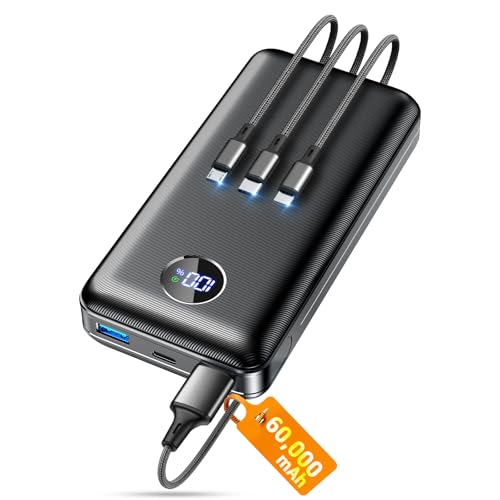
Portable Charger Power Bank, 60000mAh Battery Pack with 3 in 1 USB-C/iOS/Micro-USB Cable, 22.5W Fast Charging Portable Phone Charger, Travel Camping Essential Powerbank for iPhone 17/16 Samsung,Ebony
Huge Capacity 60000mAh Power Bank: ZZI portable charger features a new high-density polymer battery that provides 10 charges…
As an affiliate, we earn on qualifying purchases.
As an affiliate, we earn on qualifying purchases.

ELEGRP WiFi Smart Rotary Triac Dimmer with 1.8 inch TFT Display Screen, Single Pole, Needs Neutral Wire, 2.4GHz Wi-Fi, Compatible with Alexa and Google Home, No Hub Required, UL Listed, 1 Pack, Black
✅ 【Smart Rotary Dimmer with Display Screen】 Easily adjust lighting levels with rotary control and view brightness percentage…
As an affiliate, we earn on qualifying purchases.
As an affiliate, we earn on qualifying purchases.